

Assessment drives performance. In classrooms and in businesses alike.
I’ve seen how online assessment tools can either sharpen instructional judgment or quietly weaken it. In education especially, timing and clarity determine whether evaluation improves learning or simply records it. Insight delivered mid-instruction changes outcomes. Insight buried in reports rarely does.
The real measure of assessment platforms isn’t how many features they advertise. It’s whether they convert performance data into informed decisions. Do they surface misconceptions early? Do they reveal patterns across a cohort? Do they make formative adjustments faster and more precisely?
The strongest systems create leverage. They help teachers intervene sooner and help organizations measure capability with confidence.
In this guide, I examine the online assessment tools that meet that standard in 2026, including how ProProfs Quiz Maker compares with other top platforms, and outline how to choose one that strengthens learning without adding friction.
Let’s begin.
What Are Online Assessment Tools?
Online assessment tools are digital systems used to create, administer, and evaluate structured tests and learning checks. They combine question authoring, automated grading, reporting dashboards, and security controls to measure knowledge, skills, and progression across educational, training, and hiring contexts.
Functionally, these tools replace manual assessment workflows with centralized digital processes. A teacher can design quizzes, assignments, and exams within a single interface, distribute them instantly, and analyze results without relying on paper or fragmented spreadsheets.
Most platforms support multiple question formats, timed delivery, randomized items, and performance analytics. More advanced systems offer item-level breakdowns, cohort comparisons, standards alignment, and longitudinal tracking, allowing educators to monitor development across units or academic terms.
In business environments, the same infrastructure supports certification programs, employee training validation, and structured hiring assessments. The mechanics remain consistent. What changes is the application.
At their core, these systems standardize evaluation while preserving flexibility in how performance is measured.
What Types of Online Assessments Should You Use?
Assessment types are best organized by purpose. The same digital platform can serve different roles depending on whether you are diagnosing readiness, guiding improvement, validating mastery, or strengthening long-term capability.
1. Diagnostic Assessment (Where Does Learning Begin?)
Diagnostic assessments establish a starting point. They identify prior knowledge, skill gaps, and readiness before instruction or training begins.
In classrooms, teachers use diagnostics to:
- Identify misconceptions before a unit starts
- Adjust lesson pacing
- Group learners strategically
In training environments, diagnostics benchmark employee skill levels before onboarding, upskilling, or compliance programs.
Use this when:
You need a baseline before teaching or training begins.
2. Formative Assessment (Assessment for Learning)
Formative assessment improves performance during the learning process. Often described as “assessment for learning,” it provides feedback that supports immediate adjustment.
These are low-stakes and iterative.
Common examples:
- Exit tickets
- Short quizzes
- Practice checks
- Module-end reviews
In corporate training, formative assessments reinforce retention and reduce knowledge decay, especially in compliance-heavy environments.
Use this when:
You want to adjust instruction or training while learning is still in progress.
3. Summative Assessment (Assessment of Learning)
Summative assessment validates mastery at the end of a learning cycle. Also known as assessment of learning, it measures achievement against defined standards.
These are typically higher stakes and formally recorded.
Common examples:
- End-of-unit exams
- Final tests
- Certification exams
- Compliance validation tests
In regulated industries, summative assessments confirm legal, safety, and policy standards have been met.
Use this when:
You need formal proof of competence or achievement.
4. Assessment as Learning (Reflection & Ownership)
Assessment as learning focuses on self-evaluation and metacognition. Learners analyze their own performance and adjust their strategies.
In education, this builds independence and deeper understanding.
In leadership development and succession planning, reflective assessments support growth into future roles.
Common examples:
- Self-assessments
- Peer reviews
- Reflection exercises
Use this when:
You want to strengthen ownership, accountability, and long-term development.
5. Performance & Skill-Based Assessments (Can They Apply It?)
Performance assessments measure applied capability. They evaluate execution in realistic or simulated conditions rather than simple recall.
In classrooms, this includes:
- Labs
- Projects
- Presentations
- Case-based work
In training and hiring contexts, simulations and role-based exercises validate operational readiness.
Use this when:
You need evidence of real-world competence.
6. Cognitive & Aptitude Assessments (How Do They Think?)
Cognitive assessments measure reasoning, analytical ability, and learning agility. They focus on how individuals process information.
These are more common in structured hiring and advanced academic screening but occasionally used in competitive academic placement.
Use this when:
You are evaluating potential, not just current knowledge.
10 Best Online Assessment Tools and Platforms
I curated this list of the best online assessment tools based on hands-on evaluation and user feedback. Each platform supports reliable test creation, delivery, and performance tracking in classrooms and professional training environments.
Here’s a comparison table based strictly on the information provided:
| Tool | Best For | Pricing |
|---|---|---|
| ProProfs Quiz Maker | Easily creating secure quizzes and assessments with AI or templates | Free plan. Paid from $4/teacher/month for K–12, $0.25/student/month for schools & districts, and $19.99/month for businesses. |
| Mentimeter | Conducting live quizzes and interactive classroom sessions | Free plan for 50 participants/month. Paid plans start at $13/presenter/month |
| Socrative | Annual certifications and live knowledge checks | Free plan for up to 5 quizzes. Paid plans start at $9.99/seat/month |
| ASSISTments | Formative math assessments | Free for teachers. Paid plans for schools and districts available on request |
| Moodle | Summative assessments with structured grading control | Free for self-hosting. Managed cloud plans start at USD 130 per year |
| Pear Assessment (Edulastic) | Curriculum-aligned custom assessments | Free plan with basic features. Paid plans start at $125 per year |
| Formative | AI-generated questions and formative classroom checks | Free plan with basic features. Paid plans start at $13 per month |
| Quizlet | Self-assessment and independent practice | Free plan with basic features. Paid plan at $35.99 per year |
| Inspera | Proctored high-stakes exams | Pricing available on request |
| Nearpod | Gamified assessments during live lessons | Free plan for up to 40 students. Paid plans start at $159 per year |
1. ProProfs Quiz Maker – Best for Easily Creating Secure Quizzes & Assessments With AI or Templates
ProProfs Quiz Maker shortens the path from content to structured assessment. I’ve used its AI quiz generator to turn PDFs, slide decks, webpages, and recorded lessons into complete quizzes with explanations, or build a full quiz from a simple prompt in seconds.
For teachers working against time, a library of 100,000+ ready-to-use quizzes and 1,000,000+ questions across subjects means a working assessment is usually just a search away. Question banks and randomization handle recurring quizzes across multiple sections without duplicating effort.
The platform supports AI-powered grading for short answer and essay responses. I can review and adjust scores before releasing results, keeping grading oversight intact while cutting manual work.
For training and compliance programs, timed exams, flexible scoring rules, automated certification, and scheduled recertification support structured validation in regulated environments.
Security features include browser lockdown, IP tracking, question pooling, and automated webcam and screen proctoring. Reporting provides performance breakdowns by learner, question, and group, supporting remediation planning, compliance documentation, and audit readiness.
The Economics Olympiad used ProProfs Quiz Maker to deliver 80,000 tests across multiple languages, saving over 1,000 hours of manual work in a single competition cycle. Here’s how they did it:
Pros:
- AI-powered quiz creation with document, video, and webpage conversion tools
- Automated grading with detailed item-level and cohort analytics
- AI-assisted grading for short answer and essay responses
- 20+ question types, including interactive items, media-based questions, and video responses.
- Instant feedback with explanations that turn every quiz attempt into a learning opportunity.
- Advanced anti-cheating controls, including automated webcam & screen proctoring, browser lockdown, and more.
Cons:
- Dark mode isn’t available.
- The platform is cloud-based, so there isn’t an option for local hosting.
User Rating: 4.5/5 (Capterra)
Pricing:
Free plan for short quizzes. Paid plans start at $4/teacher/month for K–12, $0.25/student/month for schools & districts, and $19.99/month for businesses and enterprises.
2. Mentimeter – Best for Conducting Live Quizzes
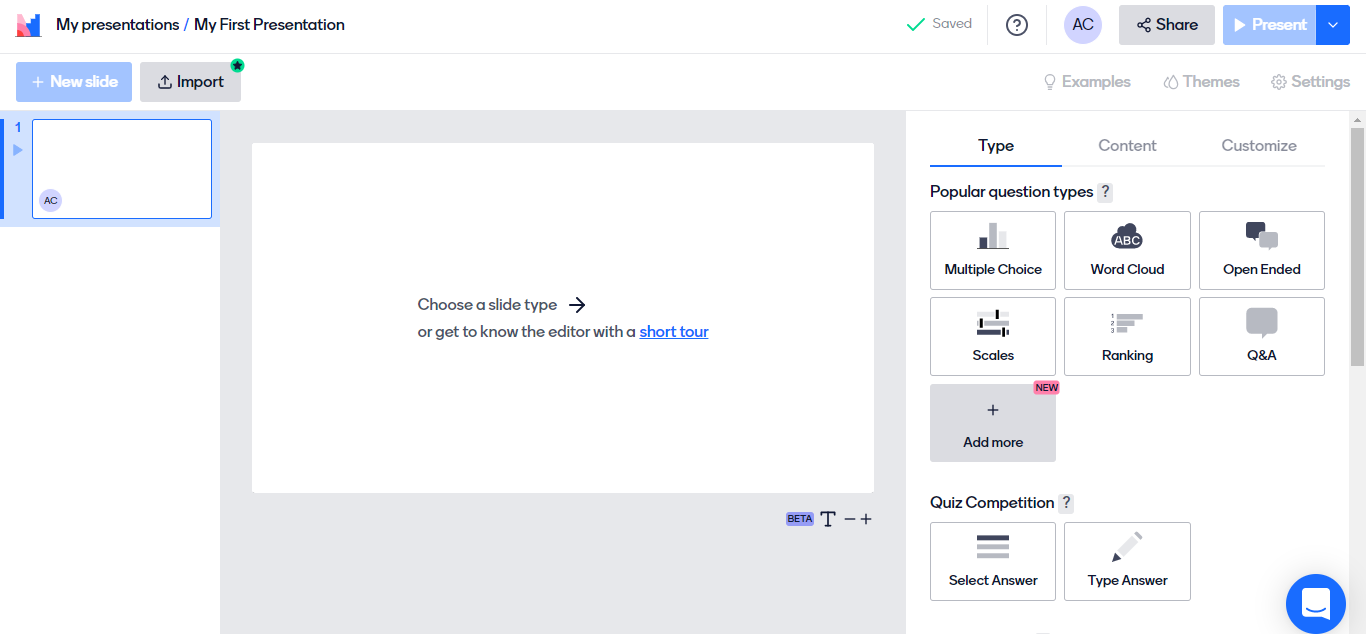
Image source: Software Advice
Mentimeter works best in live teaching environments where immediate audience response matters. I’ve used it during workshops and classroom sessions when I needed instant feedback rather than post-session grading. Its strength lies in real-time interaction, not traditional exam delivery.
Teachers can launch live quizzes, polls, word clouds, and Q&A sessions that students join from their own devices. Responses appear instantly on screen, which helps adjust pacing, revisit misunderstood concepts, or spark discussion. This makes it useful for formative checks rather than formal assessments.
In training settings, Mentimeter supports interactive presentations, quick knowledge checks, and team-based activities. Pre-designed templates simplify session setup, especially for recurring workshops or onboarding programs.
The platform emphasizes engagement over deep analytics. It works best when the goal is participation and visibility rather than certification or compliance tracking.
Pros:
- Real-time live quizzes with instant visual response display
- Interactive formats including polls, word clouds, and Q&A sessions
- Smartphone access without requiring complex setup
- Pre-designed templates for workshops and classroom activities
- Quick Slides feature for adding contextual content mid-session
Cons:
- Some users reported difficulties when trying to upload presentations.
- During team-based activities, using codes to vote can become confusing and cumbersome.
User Rating: 4.4/5 (Capterra)
Pricing:
Free plan available for 50 participants/month. Paid plans start at $13/presenter/month.
3. Socrative – Best for Annual Certifications
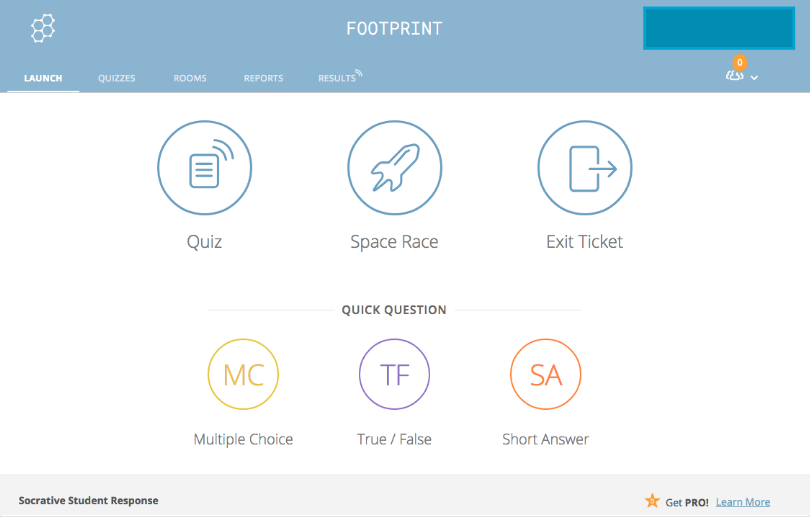
Image source: Educraft
Socrative is built for live classroom response and structured knowledge checks. I’ve seen it used most effectively for quick formative assessments, exit tickets, and periodic certification-style quizzes where real-time visibility matters. The platform allows teachers to launch quizzes instantly and view responses as they come in, which helps adjust instruction during the session.
In K–12 and higher education settings, Socrative supports multiple quiz formats and room-based access, making it easy to manage different classes. Features such as unique room codes, student login controls, and organized folders simplify recurring assessments across terms.
In training environments, it can support annual certifications and knowledge validation through timed quizzes and controlled access using employee IDs. Staff import via CSV or Excel reduces administrative setup when managing larger groups.
Shareable room links allow learners to join quickly, and the silent hand-raise feature enables discreet feedback during live sessions without interrupting flow.
Pros:
- Real-time response tracking for live instructional adjustment
- Supports up to 200 participants in a single active room
- Multiple private or public rooms for separate cohorts or projects
- Bulk staff import via CSV or Excel for streamlined setup
- Organized folders for managing quizzes and reports across terms
Cons:
- Limited question type variety, including no drawing or graph responses
- Interface navigation can feel unintuitive for some users
User Rating: 4.4/5 (Capterra)
Pricing:
Free plan available for up to 5 quizzes. Paid plans start at $9.99/seat/month.
4. ASSISTments – Best for Formative Math Assessments
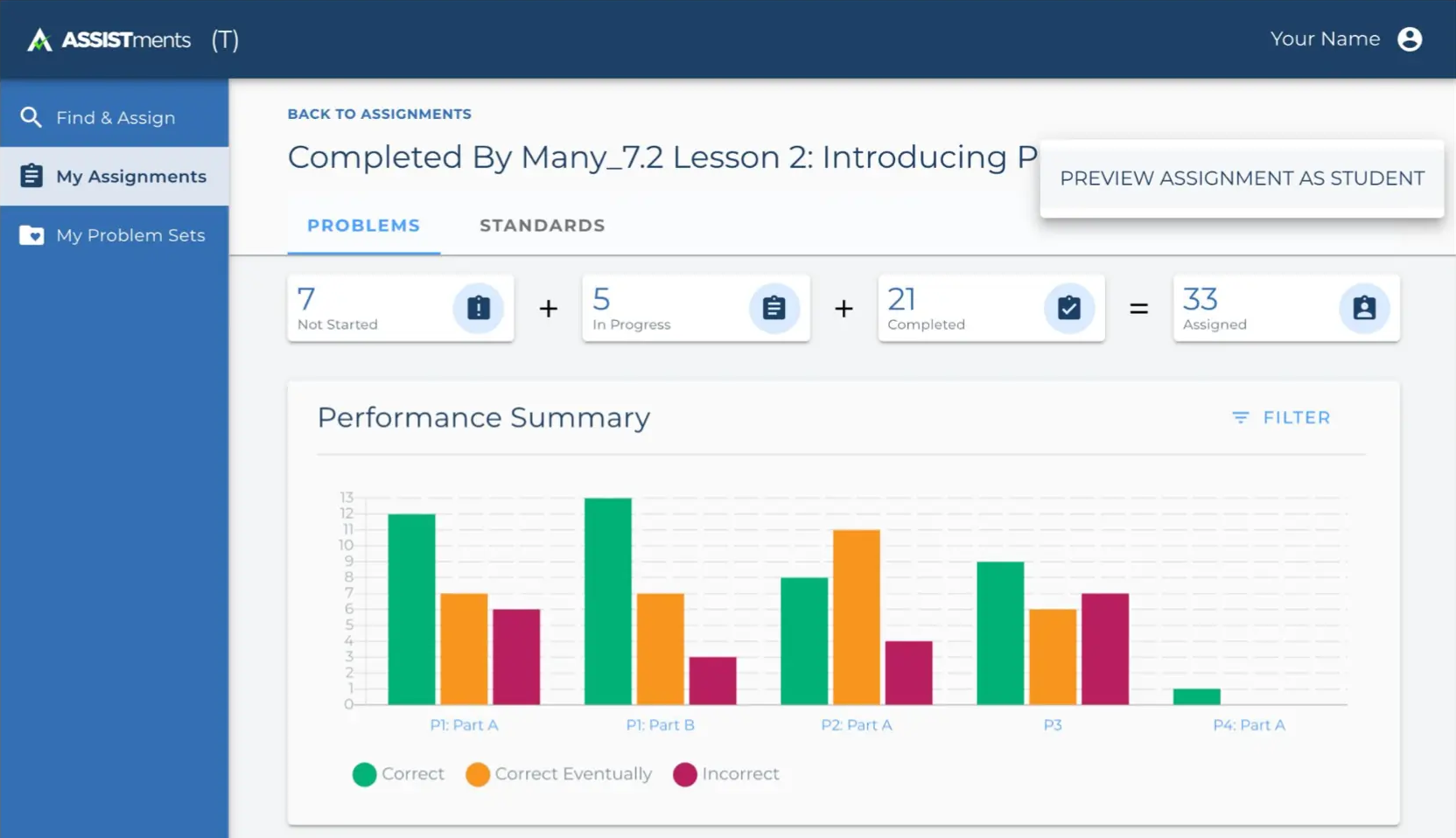
Image source: ASSISTments
ASSISTments is designed specifically for formative math instruction. I’ve seen it used most effectively in classrooms where teachers want visibility into how students are reasoning, not just whether they answered correctly. The platform delivers immediate feedback to students while capturing detailed response data in the background.
I find the real value lies in that feedback loop. Teachers can review performance trends across standards and questions during the same unit, then adjust instruction before misunderstandings compound. It supports assessment for learning rather than assessment after learning.
The Insights Hub provides structured dashboards with visualized data aligned to district achievement goals. I’ve observed instructional leaders use this to guide intervention planning and curriculum refinement at scale.
ASSISTments Tutor extends this model into high-impact tutoring programs, offering structured intervention tools built around the same formative principles.
Pros:
- Seamless integration with learning management systems for assigning and grading assessments
- Instant student performance data that informs instructional adjustments
- Dedicated ASSISTments Tutor tools for structured intervention and tutoring programs
- Data-driven discussion features that reinforce conceptual mastery and understanding
Cons:
- Primarily focused on math, limiting cross-subject flexibility
- Student interface can feel text-heavy and visually limited
User Rating: 5/5 (Common Sense Education)
Pricing: Free for teachers. Paid plans available for schools and districts (pricing available on request).
5. Moodle – Best for Summative Assessments
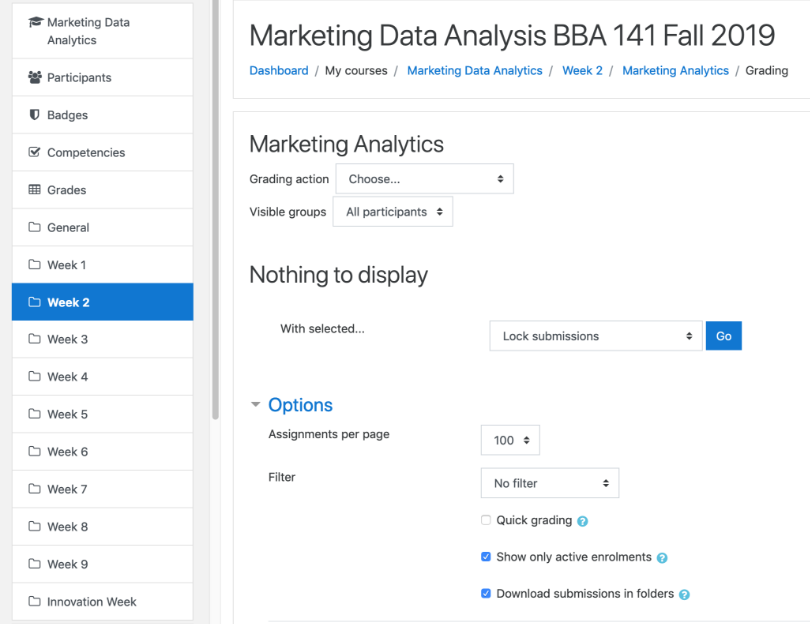
Image source: Moodle
Moodle works well when assessment needs structure and control. I’ve used its assignment and quiz tools in environments where grading policies, deadlines, and documentation must be clearly defined. It supports both formative activities and high-stakes summative exams within a single framework.
For summative assessments, instructors can define open and close dates, attempt limits, and required passing scores. If a student needs a retake, access can be reopened manually without rebuilding the assessment. This level of control is useful in academic programs where grading policies must remain consistent across sections.
Submission flexibility is another strength. Moodle supports online text entries, file uploads, and offline grading workflows. I’ve found bulk download and feedback upload especially practical when managing larger cohorts.
Advanced grading tools, including marking guides and rubrics, bring transparency to scoring. In training contexts, the same structure supports certification tracking and compliance documentation.
Pros:
- Intuitive interface for managing structured assignments and quizzes
- Multiple submission formats, including text entries and file uploads
- Centralized platform for creating, distributing, and grading assessments
- Advanced grading tools such as marking guides and detailed rubrics
Cons:
- Occasional technical issues such as server downtime or connectivity problems
- Limited built-in communication tools for real-time clarification
User Rating: 4.6/5 (Capterra)
Pricing: Free for self-hosting. Managed cloud plans start at USD 130 per year.
6. Pear Assessment (Formerly Edulastic) – Best for Curriculum Aligned Custom Assessments
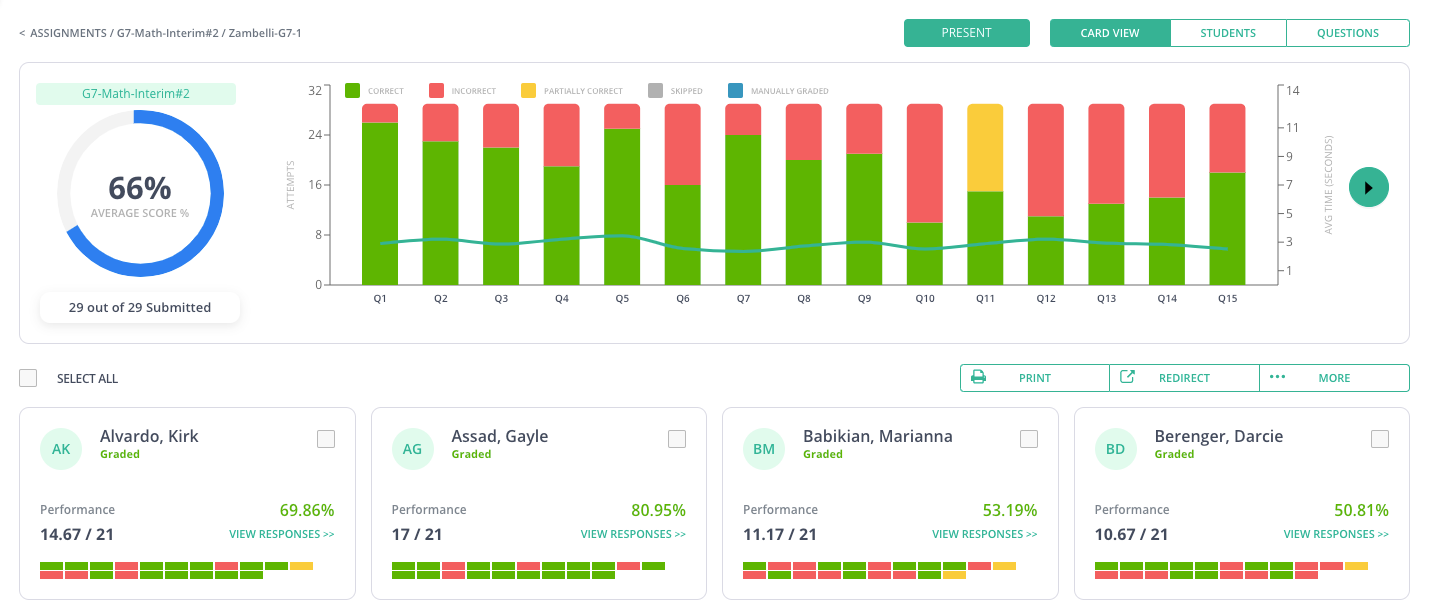
Image source: Pear Assessment
Pear Assessment is built around standards alignment and structured academic measurement. I’ve seen it used most effectively in districts where alignment to state standards and test blueprints is non-negotiable. The platform provides access to a large bank of standards-aligned questions, which reduces manual item creation.
One feature I find particularly useful is the ability to build curriculum-aligned custom assessments quickly. Teachers can select items mapped to specific standards, Depth of Knowledge levels, and Bloom’s Revised Taxonomy categories. That makes performance analysis more instructional rather than just numerical.
The platform also includes pre-built benchmark-style assessments designed to mirror high-stakes exams. This supports summative preparation without requiring teachers to design large-scale mock tests from scratch.
Analytics provide class-level and individual performance insights, which help identify patterns before formal state testing or certification cycles.
Pros:
- Wide range of question types, including open-ended and drag-and-drop formats
- Large standards-aligned item bank curated by assessment specialists
- Instant student feedback to support instructional adjustment
- Robust performance analytics at individual and class levels
Cons:
- Google Classroom integration can require additional setup steps
- Occasional reports of duplicate test generation issues
User Rating: 4.3/5 (Capterra)
Pricing: Free plan with basic features. Paid plans start at $125 per year.
7. Formative – Best for AI-Generated Questions
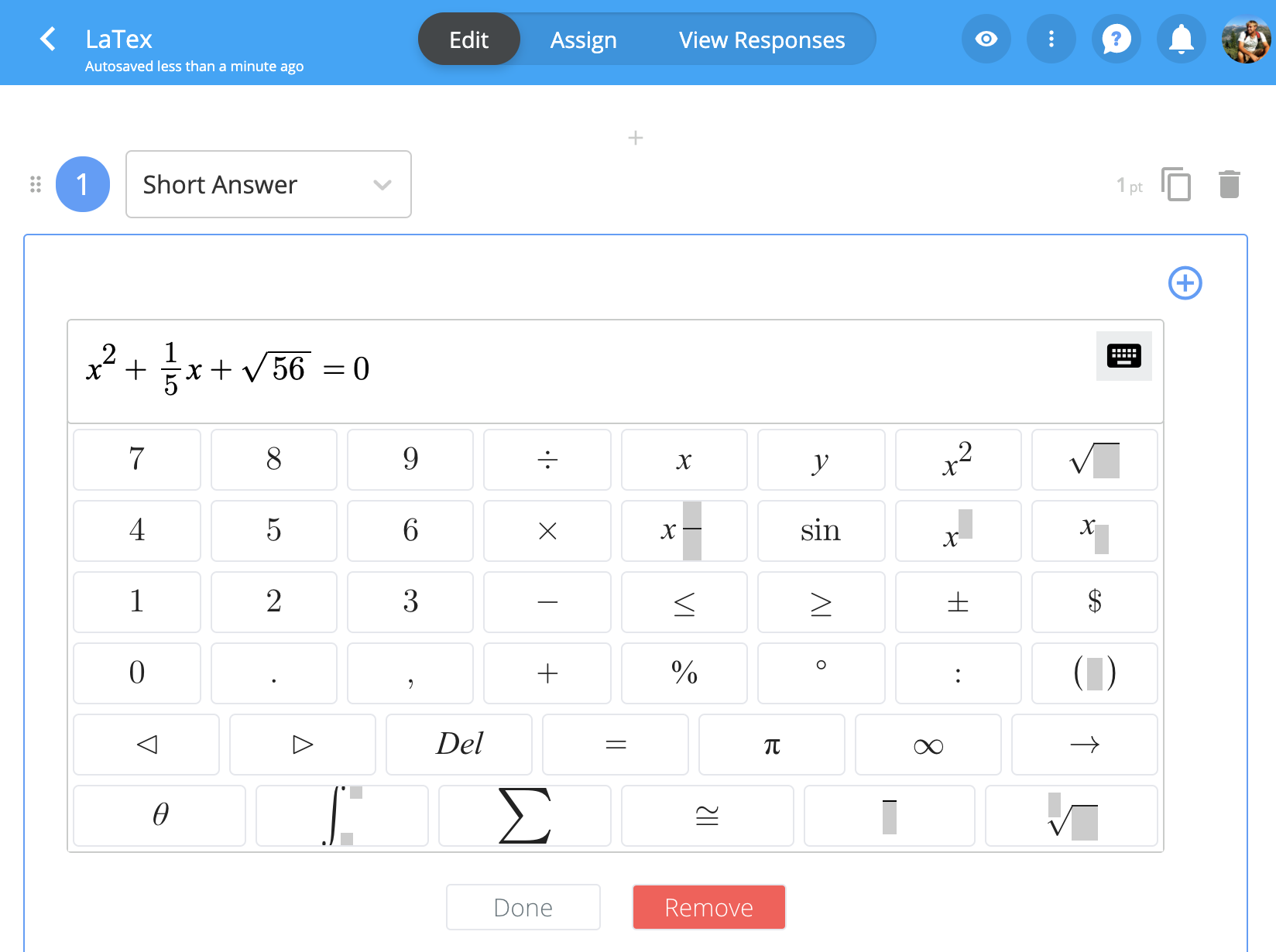
Image source: Formative
Formative focuses on continuous instructional feedback with growing AI support. I’ve seen it used most effectively when teachers need to generate standards-aligned questions quickly without sacrificing alignment. The AI tools allow educators to create items, assignments, and prompts in minutes rather than building them manually.
The platform supports multiple response types, including written answers, drawing, video responses, and objective formats. That flexibility makes it suitable for formative checks across subjects such as Math, Science, ELA, and Social Studies.
One capability I find particularly practical is the AI-generated hints feature. It supports student independence by guiding learners while they work, which reinforces assessment for learning rather than simple grading.
In structured training environments, Formative can support skill checks and progress monitoring, though its strength remains classroom-focused instruction.
Pros:
- AI-generated standards-aligned questions and assignments
- Wide variety of student response formats, including drawing and video
- Customizable feedback options and rubric-based grading tools
- Integrations with Google Classroom, Canvas, Schoology, and Clever
Cons:
- Limited design customization flexibility
- No built-in support for group collaboration or family access
User Rating: 4/5 (Common Sense Education)
Pricing: Free plan with basic features. Paid plans start at $13 per month.
8. Quizlet – Best for Self-Assessment
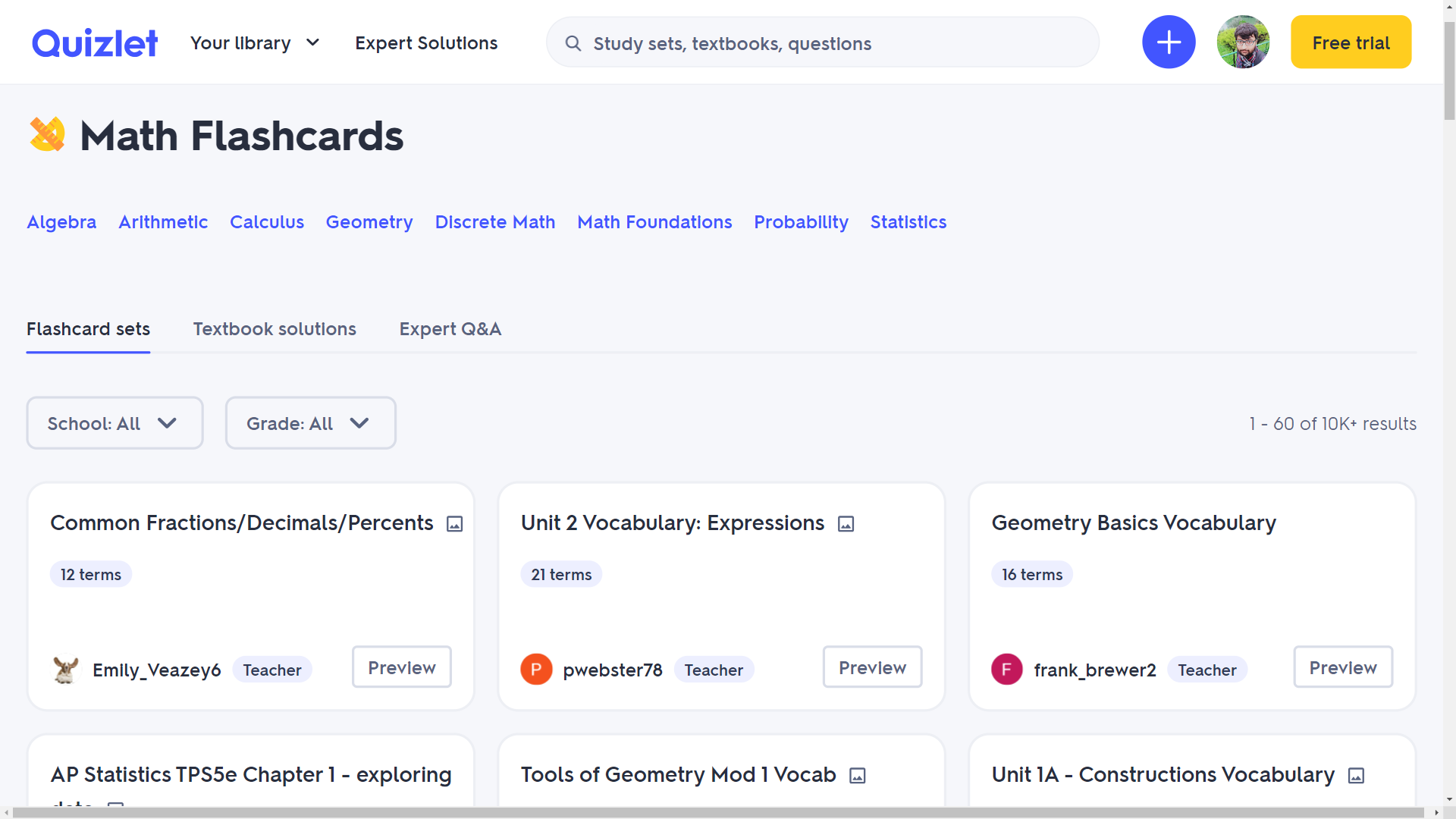
Image source: Skilljar Help Center
Quizlet is designed primarily for independent practice rather than formal testing. I’ve seen it used most effectively when students need repeated exposure to concepts before an exam. Its strength lies in retrieval practice, not structured evaluation.
The Test Mode feature allows learners to generate practice tests from study sets, combining multiple-choice, true/false, and written responses. Students can control timing and retake assessments, which supports spaced repetition and exam preparation.
Because much of the content is user-generated, I typically view Quizlet as a reinforcement tool rather than a primary assessment platform. Teachers can create their own verified study sets to reduce inaccuracies and guide focused revision.
In training environments, it works best for knowledge refreshers and low-stakes reinforcement rather than compliance validation or certification tracking.
Pros:
- Extensive library of pre-made study sets across subjects
- Multiple learning modes, including flashcards and practice tests
- Game-based formats that encourage active recall
- Mobile app access for on-the-go practice
Cons:
- Heavy reliance on memorization can encourage surface learning
- User-generated content may contain inaccuracies
User Rating: 4.6/5 (Capterra)
Pricing: Free plan with basic features. Paid plan priced at $35.99 per year.
9. Inspera – Best for Proctored Exams
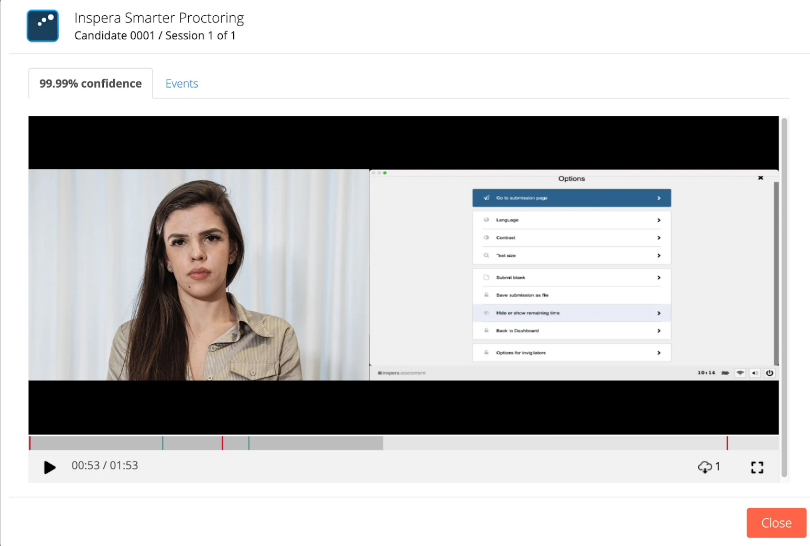
Image source: Inspera
Inspera is built for high-stakes, securely delivered exams. Among online assessment tools designed for institutional use, it focuses heavily on test integrity and remote proctoring infrastructure. I’ve seen it used most often in universities and certification bodies where exam security cannot be compromised.
The platform supports both onsite and remote assessment delivery. Its smart proctoring system records candidate behavior, verifies identity, and flags irregular activity. Institutions can choose between record-and-review proctoring or live proctoring, depending on policy requirements.
From an administrative perspective, Inspera centralizes planning, authoring, delivery, grading, and reporting. That structure supports standardized examination workflows across departments and locations.
While it prioritizes security and scale, it is less focused on lightweight formative classroom assessment. It works best in controlled environments where compliance, accreditation, or regulatory oversight matters.
Pros:
- Integrated authoring, delivery, grading, and proctoring system
- Automated identity verification and behavioral monitoring tools
- Flexible proctoring modes: live, recorded, or hybrid models
- Secure browser, webcam, screen share, and audio monitoring options
Cons:
- Limited support for highly complex STEM formatting and diagramming
- No dedicated tool for comparing similar essay responses
User Rating: 3.9/5 (Capterra)
Pricing: Available on request.
10. Nearpod – Best for Gamified Assessments
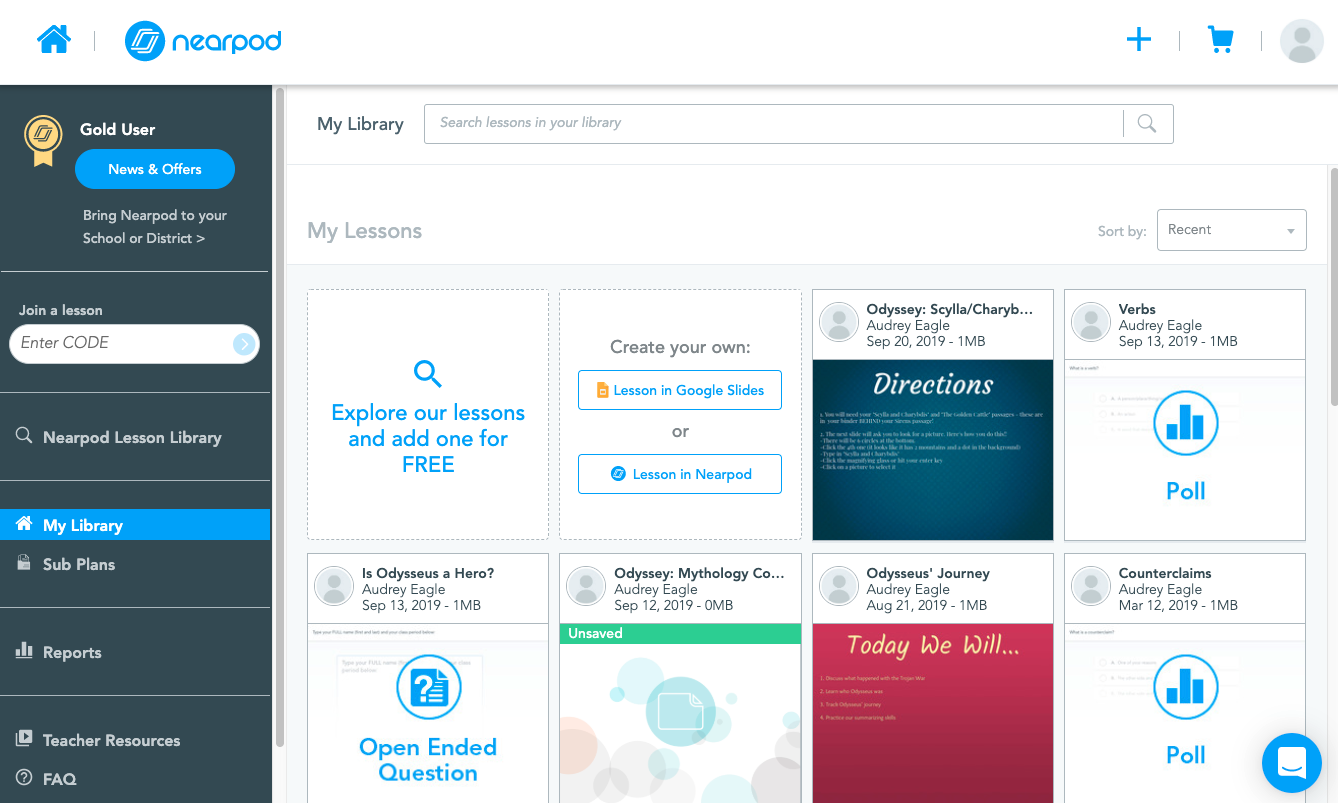
Image source: Nearpod
Nearpod blends instruction and assessment into a single interactive flow. Among online assessment tools used in classrooms, it is designed less for formal testing and more for active engagement. I’ve seen it used most effectively during live lessons where participation drives comprehension.
Teachers can embed quizzes, polls, matching exercises, and drawing activities directly into slides. Features like Time to Climb, Drag & Drop, and Draw It turn assessment into a participatory activity rather than a static test. Responses appear in real time, which supports formative adjustments mid-lesson.
The platform also provides access to a library of standards-aligned lessons and media resources. That integration reduces preparation time while keeping assessment connected to instruction.
Nearpod works best when assessment supports engagement and concept reinforcement. It is less suited for high-stakes certification or compliance-heavy environments that require advanced reporting or proctoring.
Pros:
- Interactive lesson formats with embedded formative assessment tools
- Real-time visibility into student understanding during live sessions
- Access to ready-to-teach, standards-aligned lesson library
- Integration with Google Slides, PowerPoint, and other classroom tools
Cons:
- Requires consistent internet access for participation
- Limited in-app video search beyond YouTube
User Rating: 4.7/5 (Capterra)
Pricing: Free plan for up to 40 students. Paid plans start at $159 per year.
Evaluation Criteria: How I Tested and Ranked Online Assessment Tools
Every platform on this list was put through the same structured evaluation process across eight categories. I combined hands-on testing with independent research, verified user reviews, and input from teachers, instructional leaders, and training professionals using these platforms in active classroom and organizational environments.
The categories below reflect what actually determines fit when assessment tools are expected to improve learning decisions, not just digitize paperwork.
Scoring Criteria:
| Category | Weight | What I Evaluated |
|---|---|---|
| Assessment Creation & AI Assistance | 20% | Question types supported, AI-assisted generation, document and video conversion, template quality, and access to prebuilt question banks aligned to curriculum standards |
| Formative Feedback & Instructional Impact | 20% | Speed and clarity of feedback delivery, item-level analytics, standards alignment, cohort comparisons, and whether insights surface during instruction rather than after it |
| Reporting & Progress Tracking | 15% | Individual and group performance breakdowns, longitudinal tracking across units and terms, exportable reports, and audit-ready documentation for compliance or accreditation |
| Security & Integrity Controls | 15% | Question randomization, browser lockdown, timed access, IP tracking, webcam-based proctoring, and how controls scale proportionally from low-stakes checks to high-stakes exams |
| Ease of Use for Teachers & Administrators | 10% | Setup time, admin learning curve, student-facing clarity, mobile responsiveness, and day-to-day efficiency for managing assessments across multiple classes or cohorts |
| LMS & System Integration | 10% | Compatibility with Google Classroom, Canvas, Moodle, Schoology, and other platforms, grade sync reliability, and how much manual administrative work the integration eliminates |
| Assessment Type Coverage | 5% | Support for diagnostic, formative, summative, performance-based, and self-assessment formats within a single platform |
| Price-to-Value | 5% | Pricing transparency, feature availability per tier, scalability for schools and districts, and how far the free plan stretches beyond initial classroom testing |
Sources I cross-referenced: verified reviews on Capterra and G2, educator discussions on Reddit and community forums, official vendor documentation, and live product walkthroughs. Assessment creation workflows, reporting output, and security controls were tested directly where access allowed.
FREE. All Features. FOREVER!
Try our Forever FREE account with all premium features!
My Top 3 Picks Among Online Assessment Tools
After reviewing the full spectrum of online assessment tools across classrooms, training programs, and secure exam environments, these three deliver the strongest balance of instructional impact, usability, and performance reliability.
1. ProProfs Quiz Maker
ProProfs Quiz Maker combines AI-powered quiz creation, automated and AI-assisted grading, structured reporting, and layered security controls. I value how quickly it turns source material into complete assessments while preserving grading oversight. It adapts well to formative classroom use, certification workflows, and secure exam delivery.
2. ASSISTments
ASSISTments is tightly focused on formative math instruction. Its real strength lies in immediate feedback tied to standards-level analytics, allowing teachers to adjust instruction mid-unit. I see it work best where ongoing visibility into reasoning patterns matters more than high-stakes testing infrastructure.
3. Inspera
Inspera centers on secure, proctored exam delivery. Its infrastructure supports identity verification, behavioral monitoring, and centralized exam administration. When assessment credibility, accreditation, or regulatory documentation is critical, its structured workflows and controlled delivery environment provide institutional-grade reliability.
What Are the Real Benefits of Online Assessment Tools?
The value of online assessment tools is not convenience alone. The real advantage is decision speed and instructional precision.
Here’s where the impact becomes measurable:
1. Earlier Identification of Learning Gaps
Digital assessment tools surface misconceptions during instruction rather than after a unit ends. Teachers can review item-level performance instantly and adjust pacing before errors compound. In training environments, early gap detection reduces compliance risk and prevents skill decay.
2. Stronger Formative Feedback Cycles
Continuous online assessment allows feedback to move from delayed correction to active guidance. Automated grading, AI-assisted scoring, and instant explanations reinforce learning while it is still unfolding.
3. Data That Supports Instructional Judgment
Mature assessment platforms provide cohort comparisons, standards alignment, and longitudinal tracking. Instead of isolated test scores, educators see patterns across time. That improves lesson design, remediation planning, and differentiation.
4. Scalable Evaluation Without Administrative Overload
Paper-based systems do not scale efficiently. Online testing tools automate distribution, grading, reporting, and certification tracking. This matters in large classrooms, district-wide deployments, and compliance-driven organizations.
I’ve seen this shift play out in real classrooms. One history teacher moved from 15 years of paper-based exams to structured digital assessments. The immediate difference wasn’t just faster grading. It was visibility. Topic-level reports made it easier to identify weak units and adjust instruction mid-term rather than after final exams.
Watch: ProProfs Case Study: From 15 Years of Paper Tests to Easy Digital Assessments
5. Improved Integrity and Fairness
Randomized question pools, timed access, browser lockdown, and proctoring controls protect assessment credibility. For certification, compliance, and structured hiring, integrity safeguards are essential.
6. Centralized Documentation and Audit Readiness
In regulated industries, documentation is as important as evaluation. Digital reporting dashboards create exportable performance records that support accreditation, compliance audits, and succession planning initiatives.
When implemented well, online assessment tools do more than digitize tests. They create faster feedback loops, stronger instructional adjustments, and more defensible performance validation across classrooms and organizations.
How Can Teachers Use Online Assessment Tools More Strategically?
Using online assessment tools effectively is not about giving more quizzes. It is about designing feedback loops that improve instruction in real time. When used strategically, digital assessment tools shift evaluation from record-keeping to decision-making.
Here is how I see high-performing classrooms use them.
1. Use Formative Checks to Adjust Instruction Within 48 Hours
Short, low-stakes quizzes work best when they influence what happens next. Instead of waiting until the end of a unit, run weekly micro-assessments and review item-level analytics immediately.
Look for:
- Questions with high error rates
- Patterns across sections
- Misconceptions tied to specific standards
Then reteach, regroup, or redesign the next lesson accordingly. The speed of adjustment is where online assessment creates real leverage.
2. Separate Formative and Summative Design
Not all assessments should look the same.
For formative checks:
- Keep them brief
- Allow multiple attempts
- Provide instant feedback
For summative exams:
- Use question banks and randomization
- Set clear scoring rules
- Lock navigation if integrity matters
- Archive reports for documentation
Strategic teachers treat assessment types differently rather than using a single template for everything.
3. Reduce Cheating Without Over-Surveillance
Academic integrity matters, but over-monitoring can damage trust.
For low-stakes checks:
- Randomize questions
- Shuffle answer options
- Use short time windows
For high-stakes exams:
- Enable browser lockdown
- Use question pooling
- Apply proctoring only when necessary
Online testing tools offer layered security. The key is proportional use.
Watch: How to Prevent Cheating in Online Exams & Assessments
4. Deliver Feedback That Improves Thinking, Not Just Scores
Scores alone do not drive growth. Explanation-based feedback does.
Use:
- Auto-grading for objective questions
- AI-assisted grading for short answers and essays
- Custom feedback comments for common errors
Review AI-generated scores before releasing results when appropriate. This keeps grading efficient while preserving instructional oversight.
5. Track Progress Across Units, Not Just Tests
One quiz tells you little. Trends tell you everything.
Strong assessment platforms allow:
- Cohort comparisons
- Standard-level tracking
- Longitudinal performance reports
Use this data during parent conferences, team meetings, or curriculum planning. Strategic use of online assessment tools means connecting today’s quiz to long-term growth.
6. Integrate Assessments With Your Existing Systems
Assessment tools work best when they reduce administrative duplication.
- Sync grades to your LMS
- Export CSV files when needed
- Maintain centralized digital records
This prevents fragmentation between instruction, grading, and reporting.
When teachers use online assessment tools with intentional structure, the outcome changes. Assessment becomes diagnostic, corrective, and developmental rather than episodic. That shift improves learning outcomes more than any single feature ever could.
Choose Online Assessment Tools That Strengthen Learning Decisions
The real value of online assessment tools is not automation. It is instructional clarity.
In classrooms, they surface misconceptions early and support faster formative adjustment. In professional training environments, they validate skills, protect compliance standards, and document performance with precision. In both cases, the impact depends less on feature count and more on how deliberately the system is used.
Some assessment platforms prioritize engagement. Others focus on proctoring. A few, such as ProProfs Quiz Maker, balance AI-driven creation, structured grading, security controls, and reporting in a way that supports both teachers and organizations without unnecessary complexity.
The strongest choice is not the tool with the longest feature list. It is the one that sharpens judgment, reduces friction, and turns assessment into a continuous feedback engine.
Choose the platform that improves decisions, not just delivery.
Frequently Asked Questions

How do teachers use online assessment tools in the classroom?
Teachers use online assessment tools for diagnostic checks, formative quizzes, summative exams, and self-assessments. These systems provide instant feedback and performance analytics, helping instructors adjust lessons based on real-time data.
What is the difference between formative and summative online assessment?
Formative assessment supports learning during instruction through low-stakes checks and feedback. Summative assessment measures mastery at the end of a unit or course through graded exams or certification tests.
Can online testing tools prevent cheating?
Yes. Many online testing tools offer question randomization, time limits, browser lockdown, IP restrictions, and proctoring options. Security settings can be adjusted depending on whether the assessment is low-stakes or high-stakes.
Are there free online assessment tools for teachers?
Yes. Several assessment platforms offer free plans with core quiz-building and grading features. For example, ProProfs Quiz Maker provides a free plan that allows teachers to create and deliver structured quizzes with automated grading and reporting.
What features should I look for in assessment creation software?
Look for flexible question types, automated grading, detailed reporting, LMS integration, anti-cheating controls, accessibility support, and question banks. Strong assessment creation software should improve instructional decisions rather than simply digitize tests.
How do online assessment tools integrate with LMS platforms?
Most online assessment tools allow grade export via CSV or direct integration with systems like Google Classroom and institutional LMS platforms. This keeps records centralized and reduces manual administrative work.
Are online assessment tools suitable for compliance and certification programs?
Yes. Many assessment platforms support timed exams, certification workflows, recertification schedules, audit-ready reporting, and secure delivery, making them suitable for regulated industries and structured training environments.

Let ProProfs AI Build a Quiz

 We'd love your feedback!
What did you like & how can we make it even better?
 Thanks for your feedback!
 Ask Your Question
Have a question? Get expert help to make your decision easier.